📚 API Reference
This page describes the public API exposed by the Tabularix library.
Functions
tabularix.load_workbook(path)

Loads metadata for an Excel workbook from the specified file path.
Sheet contents are lazily loaded on demand when get_sheet() is called.
Parameters:
| Name | Type | Description | Default |
|---|---|---|---|
path
|
str
|
Path to the .xlsx file. |
required |
Returns:
| Type | Description |
|---|---|
Workbook
|
A Workbook object with metadata and lazy sheet loading capabilities. |
Raises:
| Type | Description |
|---|---|
FileNotFoundError
|
If the file does not exist at the given path. |
IOError
|
If there is an error reading or parsing the file metadata. |
tabularix.extract_table_with_header_and_data(sheet, header_pattern, data_pattern, *, main_direction='TB', inner_direction='LR', clean_names=True, flatten_header=True, header_separator='_')

Extracts a structured Table using explicit header and data patterns.
This function locates the header row/columns in the worksheet and searches for the matching data records situated relative to the header.
Parameters:
| Name | Type | Description | Default |
|---|---|---|---|
sheet
|
Sheet
|
The worksheet to extract the table from. |
required |
header_pattern
|
group | grid
|
The pattern representing the table's header. |
required |
data_pattern
|
group | grid
|
The pattern representing the table's data rows/columns. |
required |
main_direction
|
Direction
|
The direction of record flow (e.g. "TB" for vertical tables). |
'TB'
|
inner_direction
|
Direction
|
The direction of cells inside each record (e.g. "LR" for row cells). |
'LR'
|
clean_names
|
bool
|
If True, cleans header column names to lower snake_case. |
True
|
flatten_header
|
bool
|
If True, flattens multi-row/column headers into single strings joined by header_separator. |
True
|
header_separator
|
str
|
The separator used to join multi-row headers when flatten_header is True. |
'_'
|
Returns:
| Type | Description |
|---|---|
Table
|
The extracted structured Table. |
Raises:
| Type | Description |
|---|---|
ValueError
|
If the header pattern or data pattern cannot be found. |
tabularix.extract_table_between_header_and_footer(sheet, header_pattern, footer_pattern, *, main_direction='TB', inner_direction='LR', clean_names=True, flatten_header=True, header_separator='_')

Extracts a structured Table situated between a matched header and footer.
This function locates the header and footer in the worksheet and extracts the region situated between them.
Parameters:
| Name | Type | Description | Default |
|---|---|---|---|
sheet
|
Sheet
|
The worksheet to extract the table from. |
required |
header_pattern
|
group | grid
|
The pattern representing the table's header. |
required |
footer_pattern
|
group | grid
|
The pattern representing the table's footer. |
required |
main_direction
|
Direction
|
The direction of record flow (e.g. "TB" for vertical tables). |
'TB'
|
inner_direction
|
Direction
|
The direction of cells inside each record (e.g. "LR" for row cells). |
'LR'
|
clean_names
|
bool
|
If True, cleans header column names to lower snake_case. |
True
|
flatten_header
|
bool
|
If True, flattens multi-row/column headers into single strings joined by header_separator. |
True
|
header_separator
|
str
|
The separator used to join multi-row headers when flatten_header is True. |
'_'
|
Returns:
| Type | Description |
|---|---|
Table
|
The extracted structured Table. |
Raises:
| Type | Description |
|---|---|
ValueError
|
If the header pattern or footer pattern cannot be found. |
Note
The footer is searched relative to the header (not the data area). Any match
positioned after the header boundary — in the main_direction — is considered
a valid footer candidate. The data range is then computed as the region between
the header and footer.
tabularix.parse_pattern_1d(pattern_str)

Parses a 1D pattern shorthand DSL string into a RangePattern1D instance.
Parameters:
| Name | Type | Description | Default |
|---|---|---|---|
pattern_str
|
str
|
The shorthand Layex DSL string (e.g. '[v: "Category"], [e]?'). |
required |
Returns:
| Type | Description |
|---|---|
RangePattern1D
|
A compiled RangePattern1D instance. |
Raises:
| Type | Description |
|---|---|
ParseError
|
If syntax or token errors are encountered during parsing. |
tabularix.parse_pattern_2d(pattern_str)

Parses a 2D pattern shorthand DSL string into a RangePattern2D instance.
Parameters:
| Name | Type | Description | Default |
|---|---|---|---|
pattern_str
|
str
|
The shorthand Layex DSL string (e.g. '([v: "Header"]) ; ([ne])+'). |
required |
Returns:
| Type | Description |
|---|---|
RangePattern2D
|
A compiled RangePattern2D instance. |
Raises:
| Type | Description |
|---|---|
ParseError
|
If syntax or token errors are encountered during parsing. |
tabularix.group = RangePattern1D
module-attribute

tabularix.grid = RangePattern2D
module-attribute

tabularix.value(val)

Creates a cell rule matching an exact string value.
tabularix.regex(pattern)

Creates a cell rule matching a regex pattern or string.
tabularix.empty()

Creates a cell rule matching an empty cell.
tabularix.non_empty()

Creates a cell rule matching a non-empty cell.
tabularix.any()

Creates a wildcard cell rule matching any cell.
Classes
tabularix.Workbook

Represents an Excel workbook containing multiple worksheets.
active_sheet_name()

Returns the name of the active worksheet in the workbook.
Returns:
| Type | Description |
|---|---|
str
|
The active worksheet name string. |
get_sheet(name)

Retrieves a worksheet by its name.
Parameters:
| Name | Type | Description | Default |
|---|---|---|---|
name
|
str
|
The case-sensitive name of the sheet. |
required |
Returns:
| Type | Description |
|---|---|
Sheet
|
The Sheet object. |
Raises:
| Type | Description |
|---|---|
KeyError
|
If no worksheet with the given name exists. |
is_sheet_loaded(name)

Checks if a worksheet is currently loaded in memory.
Parameters:
| Name | Type | Description | Default |
|---|---|---|---|
name
|
str
|
The name of the sheet. |
required |
Returns:
| Type | Description |
|---|---|
bool
|
True if loaded in memory cache, False otherwise. |
Raises:
| Type | Description |
|---|---|
KeyError
|
If no worksheet with the given name exists. |
open_sheet(name)

Context manager for managing a worksheet's lifecycle.
Loads the worksheet on entry and automatically unloads it from memory on exit.
Parameters:
| Name | Type | Description | Default |
|---|---|---|---|
name
|
str
|
The name of the sheet to open. |
required |
Returns:
| Type | Description |
|---|---|
ContextManager[Sheet]
|
A context manager yielding the Sheet object. |
sheet_names()

Returns a list of all sheet names in the workbook.
Returns:
| Type | Description |
|---|---|
list[str]
|
A list of sheet name strings. |
unload_all_sheets()

Unloads all cached worksheets from memory.
Returns:
| Type | Description |
|---|---|
int
|
The number of sheets evicted from memory cache. |
unload_sheet(name)

Unloads a worksheet from memory cache.
Parameters:
| Name | Type | Description | Default |
|---|---|---|---|
name
|
str
|
The name of the sheet to unload. |
required |
Returns:
| Type | Description |
|---|---|
bool
|
True if the sheet was loaded and evicted, False if already unloaded. |
Raises:
| Type | Description |
|---|---|
KeyError
|
If no worksheet with the given name exists. |
tabularix.Sheet

Represents a single worksheet as a grid of cell values. It provides methods to inspect and modify cells, update the sheet content, and render the sheet visually.
name
property

The name of the worksheet.
shape
property

A tuple of (rows, columns) representing the size of the cell grid.
copy()

Creates an independent copy (deep copy) of the worksheet.
Returns:
| Type | Description |
|---|---|
Sheet
|
A new Sheet instance that is a deep copy of this sheet. |
get_cell_value(row, col)

Retrieves the value of a cell at the given 0-based row and column indices.
Parameters:
| Name | Type | Description | Default |
|---|---|---|---|
row
|
int
|
0-based row index. |
required |
col
|
int
|
0-based column index. |
required |
Returns:
| Type | Description |
|---|---|
Any
|
The cell's value (None, str, float, int, bool, datetime.date, datetime.datetime, or an error string). |
Raises:
| Type | Description |
|---|---|
IndexError
|
If the indices are out of bounds. |
set_cell_value(row, col, value)

Sets the value of a cell at the given 0-based row and column indices.
Parameters:
| Name | Type | Description | Default |
|---|---|---|---|
row
|
int
|
0-based row index. |
required |
col
|
int
|
0-based column index. |
required |
value
|
str
|
The string value to write to the cell. |
required |
Raises:
| Type | Description |
|---|---|
IndexError
|
If the indices are out of bounds. |
TypeError
|
If the value is not a string. |
search_range(matcher, start_row=None, end_row=None, start_col=None, end_col=None)

Searches the worksheet (or a sub-grid of it) for the first matching sequence of rows.
Parameters:
| Name | Type | Description | Default |
|---|---|---|---|
matcher
|
RangeMatcher
|
The RangeMatcher pattern to search for. |
required |
start_row
|
int | None
|
Optional 0-based row to start searching from (defaults to 0). |
None
|
end_row
|
int | None
|
Optional 0-based row to stop searching at (inclusive, defaults to last row). |
None
|
start_col
|
int | None
|
Optional 0-based column limit (inclusive, defaults to 0). |
None
|
end_col
|
int | None
|
Optional 0-based column limit (inclusive, defaults to last column). |
None
|
Returns:
| Type | Description |
|---|---|
Range | None
|
A Range enclosing the matched boundaries, or None if no match is found. |
Raises:
| Type | Description |
|---|---|
ValueError
|
If start_row > end_row or start_col > end_col. |
IndexError
|
If any of the indices are out of bounds. |
search_range_relative(matcher, *, below=None, above=None, left=None, right=None)

Searches for a range relative to one or more previously matched ranges.
Parameters:
| Name | Type | Description | Default |
|---|---|---|---|
matcher
|
RangeMatcher
|
The RangeMatcher pattern to search for. |
required |
below
|
Range | None
|
Optional Range boundary. |
None
|
above
|
Range | None
|
Optional Range boundary. |
None
|
left
|
Range | None
|
Optional Range boundary. |
None
|
right
|
Range | None
|
Optional Range boundary. |
None
|
Returns:
| Type | Description |
|---|---|
Range | None
|
A Range enclosing the matched boundaries, or None if no match is found. |
Raises:
| Type | Description |
|---|---|
ValueError
|
If relational boundaries conflict or if opposing spans do not align. |
get_range_between(start, end)

Calculates the Range coordinates situated between two non-overlapping ranges.
Supports ranges separated either vertically or horizontally.
Parameters:
| Name | Type | Description | Default |
|---|---|---|---|
start
|
Range
|
The boundary Range positioned first (above or to the left). |
required |
end
|
Range
|
The boundary Range positioned second (below or to the right). |
required |
Returns:
| Type | Description |
|---|---|
Range
|
A new Range object representing the coordinates between the start and end ranges. |
Raises:
| Type | Description |
|---|---|
ValueError
|
If the ranges overlap, are separated diagonally, or if their respective aligning spans (columns/rows) do not match. |
extract_table(data, header=None, clean_names=False, flatten_header=False, header_separator='_')

Extracts a structured Table from the specified data and header ranges.
Parameters:
| Name | Type | Description | Default |
|---|---|---|---|
data
|
Range
|
The Range defining the rows and columns containing the table's data. |
required |
header
|
Range | None
|
An optional Range defining the column headers. |
None
|
clean_names
|
bool
|
If True, cleans header column names to lower snake_case. |
False
|
flatten_header
|
bool
|
If True, flattens multi-row headers into single strings joined by header_separator. If False (default), represents multi-row headers as nested structures. |
False
|
header_separator
|
str
|
Delimiter used to join multi-row headers when flatten_header is True. Defaults to "_". |
'_'
|
Returns:
| Type | Description |
|---|---|
Table
|
A Table object wrapping the structured data. |
Raises:
| Type | Description |
|---|---|
ValueError
|
If the header and data ranges do not align horizontally, if they overlap, or if their column counts differ. |
IndexError
|
If the ranges exceed the current dimensions of the sheet. |
to_svg(path, zero_based_indices=True, anonymise_ranges=None)

Renders the worksheet to a beautifully styled SVG file.
Parameters:
| Name | Type | Description | Default |
|---|---|---|---|
path
|
str
|
Target file path where the SVG should be saved. |
required |
zero_based_indices
|
bool
|
If True, uses 0-based indexing for headers (default); otherwise 1-based. |
True
|
anonymise_ranges
|
Range | str | list[Range | str] | None
|
Optional single Range/A1 string or list of Range/A1 strings defining regions to anonymise. |
None
|
Raises:
| Type | Description |
|---|---|
IOError
|
If writing to the destination path fails. |
ValueError
|
If an invalid A1 string notation is provided. |
TypeError
|
If an element is not a Range or string. |
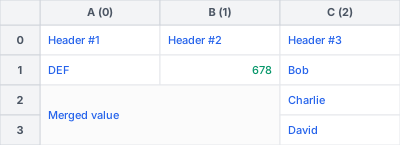
drop_row(row_idx)

Deletes a row from the sheet.
Parameters:
| Name | Type | Description | Default |
|---|---|---|---|
row_idx
|
int
|
Zero-based index of the row to drop. |
required |
Raises:
| Type | Description |
|---|---|
IndexError
|
If row_idx is out of bounds or negative. |
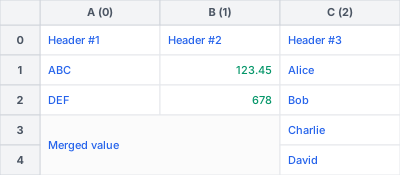
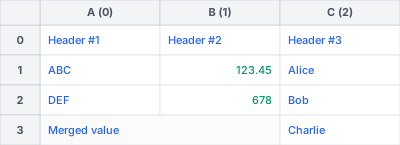
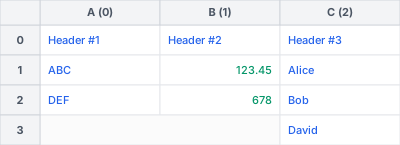
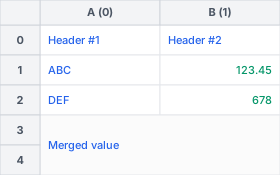
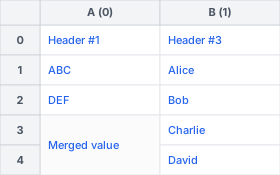
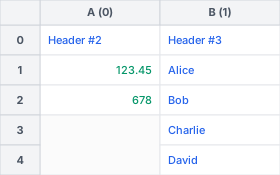
Example
drop_column(col_idx)

Deletes a column from the sheet.
Parameters:
| Name | Type | Description | Default |
|---|---|---|---|
col_idx
|
int
|
Zero-based index of the column to drop. |
required |
Raises:
| Type | Description |
|---|---|
IndexError
|
If col_idx is out of bounds or negative. |
Example
search_and_drop(str_or_regex, drop_direction)

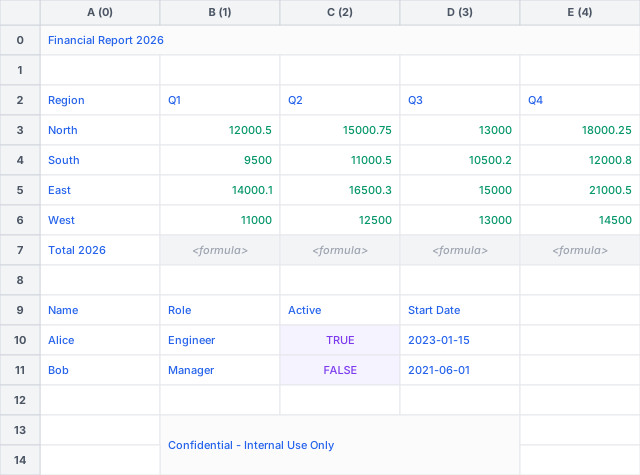
Searches for a text or compiled regex pattern and drops rows/columns in the specified direction. Regex matches use Python flavor Regular Expressions.
Parameters:
| Name | Type | Description | Default |
|---|---|---|---|
str_or_regex
|
str | Pattern[str]
|
A string to search for (exact match), or a compiled regex pattern (from |
required |
drop_direction
|
Literal['top', 'bottom', 'left', 'right', 'top_left', 'top_right', 'bottom_left', 'bottom_right']
|
The direction in which to drop rows/columns relative to the match. |
required |
Returns:
| Type | Description |
|---|---|
tuple[tuple[int, int], tuple[int, int]]
|
A nested tuple of ((orig_row, orig_col), (new_row, new_col)) representing the 0-based coordinates of the matched cell before and after the drop operations. |
Raises:
| Type | Description |
|---|---|
TypeError
|
If str_or_regex is neither a string nor a compiled regex pattern. |
ValueError
|
If the search term is not found, or if an invalid drop_direction is provided. |
Example
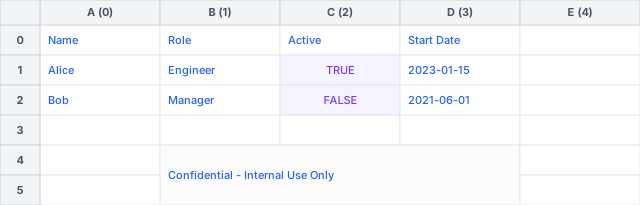
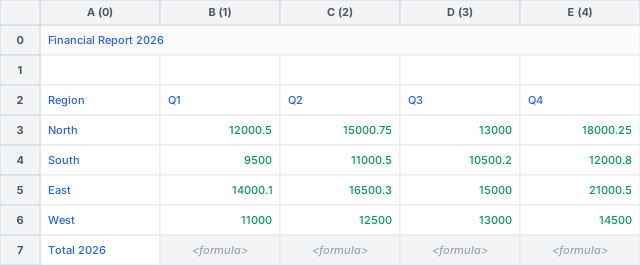
unmerge_cells(target_ranges=None, fill_direction='bottom_right')

Unmerges merged cell regions in the worksheet.
Parameters:
| Name | Type | Description | Default |
|---|---|---|---|
target_ranges
|
Range | str | list[Range | str] | None
|
Optional Range instance, A1 notation string (e.g. "A1:C5"), or list of Range/A1 strings
specifying the region(s) to unmerge. If |
None
|
fill_direction
|
Literal['bottom_right', 'bottom', 'right']
|
The direction along which to repeat the top-left parent cell value.
One of |
'bottom_right'
|
Note
Partial Overlaps: Any merged region that intersects with target_ranges is completely
unmerged and removed from the worksheet's merged regions metadata.
Raises:
| Type | Description |
|---|---|
ValueError
|
If fill_direction is invalid or if an invalid A1 string is provided. |
TypeError
|
If target_ranges is not a Range, string, list, or None. |
Example
tabularix.RangePattern1D

A direction-agnostic one-dimensional sequence of cell pattern rules.
__init__(*elements)

Initializes a new 1D pattern with the given cell rules or nested 1D patterns.
__repr__()

Returns a valid Python expression representing this 1D pattern.
__str__()

Returns the shorthand DSL string representation of this 1D pattern.
one_or_more(greedy=True)

Sets the cardinality of this 1D pattern to one-or-more (+).
optional(greedy=True)

Sets the cardinality of this 1D pattern to optional (?).
repeat(min, max=-1, greedy=True)

Sets the cardinality of the 1D pattern to repeat a custom number of times or range.
to_matcher(direction='LR')

Converts this 1D pattern to a RangeMatcher bound to the specified matching direction.
to_rust()

Compiles this Python pattern into a Rust-native _RangePattern1D object.
zero_or_more(greedy=True)

Sets the cardinality of this 1D pattern to zero-or-more (*).
tabularix.RangePattern2D

A direction-agnostic two-dimensional pattern consisting of a sequence of one-dimensional patterns.
__init__(*patterns)

Initializes a new 2D pattern with the given list of 1D patterns.
__repr__()

Returns a valid Python expression representing this 2D pattern.
__str__()

Returns the shorthand DSL string representation of this 2D pattern.
to_matcher(outer_direction='TB', inner_direction='LR')

Converts this 2D pattern to a RangeMatcher bound to the specified scanning directions.
tabularix.RangeMatcher

Represents a compiled pattern matcher bound to specific matching directions.
__init__(row_patterns, outer_direction, inner_direction, max_depth=1000)

Initializes a RangeMatcher with a list of 1D patterns and the orthogonal outer and inner directions.
matches_range(rows)

Checks if a sequence of rows matches the range patterns.
Parameters:
| Name | Type | Description | Default |
|---|---|---|---|
rows
|
list[list[Any]]
|
A list of rows, where each row is a list of cell values. |
required |
Returns:
| Type | Description |
|---|---|
bool
|
True if all row patterns match the sequence of rows; False otherwise. |
tabularix.Range

Represents a region inside a worksheet enclosing absolute coordinate boundaries.
end_col
property

The 0-based index of the last column (inclusive).
end_row
property

The 0-based index of the last row (inclusive).
start_col
property

The 0-based index of the first column (inclusive).
start_row
property

The 0-based index of the first row (inclusive).
__init__(start_row, end_row, start_col, end_col)

Initializes a new Range instance with absolute bounds.
from_a1(a1_str)
staticmethod

Creates a Range from an A1 notation string (e.g. "B2:D6" or "B2").
Parameters:
| Name | Type | Description | Default |
|---|---|---|---|
a1_str
|
str
|
The A1 notation range string. |
required |
Returns:
| Type | Description |
|---|---|
Range
|
A Range instance enclosing the parsed coordinates. |
Raises:
| Type | Description |
|---|---|
ValueError
|
If the A1 string is invalid or has unbounded formats (e.g. "A:B", "1:2"). |
tabularix.Table

Represents a structured table extracted from a worksheet.
columns
property

Returns the column names of the table.
shape
property

Returns the dimensions (num_rows, num_cols) of the table.
__arrow_c_stream__(requested_schema=None)

Exports the table data as an Arrow C stream pointer wrapped in a PyCapsule.
This method implements the standard Arrow PyCapsule Interface for streams.
Parameters:
| Name | Type | Description | Default |
|---|---|---|---|
requested_schema
|
Any
|
An optional capsule containing an Arrow C Schema structure. |
None
|
Returns:
| Type | Description |
|---|---|
Any
|
A PyCapsule object named "arrow_array_stream". |
to_arrow()

Converts the Table to a PyArrow Table.
Returns:
| Type | Description |
|---|---|
Table
|
A PyArrow Table. |